
c++
programming language
1- Extremely Basic :
Read 2 variables, named A and B and make the sum of these two variables, assigning its result to the variable X. Print X as shown below. Print endline after the result otherwise you will get “Presentation Error”.
Input
The input file will contain 2 integer numbers.
Output
Print X according to the following example, with a blank space before and after the equal signal.
Sample Input : Sample Output :
10 X = 19
9
2- Area of a Circle :
---------------------------------------------------------------------------------------------------------
The area of the circle is defined as A = π . R2, having π as 3.14159.
Calculate the area using the formula given in the problem description.
Input
Read the variable R (double precision), that is the radius of the circle.
Output
Print the variable A, rounded to four decimal digits.
Sample Input : Sample Output :
2 A=12.5664
---------------------------------------------------------------------------------------------------------
3- Simple Sum :
The area of the circle is defined as A = π . R2, having π as 3.14159.
Calculate the area using the formula given in the problem description.
Input
Read the variable R (double precision), that is the radius of the circle.
Output
Print the variable A, rounded to four decimal digits.
Sample Input : Sample Output :
2 A=12.5664
---------------------------------------------------------------------------------------------------------
4- Simple Product :
Make a simple problem that only read two integer values. After that, calculate the product between them and store the result in a variable named PROD. Print the result like the sample below. Do not forget to print the end line after the result otherwise you will get “Presentation Error”.
Input
The input file will contain 2 integer numbers.
Output
Print PROD according to the following example, with a blank space before and after the equal signal.
Sample Input : Sample Output :
3 PROD = 27
9
---------------------------------------------------------------------------------------------------------
5- Average 1 :
Make a simple program that read two floating numbers corresponding to two tests for a student. After, calculate the average between them, considering that the first number has 3.5 weight and the second one have 7.5 weight. Each number can be from zero to ten, always with one digit after the decimal point. Don’t forget to print end line after the result otherwise you will get “Presentation Error”. Don’t forget the space before and after the equal sign.
Input
The input file will contain 2 floating-point numbers with one digit after the decimal point.
Output
Print MEDIA(average in portuguese) according to the following example, with 5 digits after the decimal point and a blank space before and after the equal signal.
Sample Input : Sample Output :
5.0 MEDIA = 6.43182
7.1
---------------------------------------------------------------------------------------------------------
6- Average 2 :
Read three numbers (variables A, B and C), which are the test scores of a student. Then, calculate the average, knowing that the note A has a weight of 2, the note B has a weight of 3 and the note C has a weight of 5. Consider that each note can go from 0 to 10.0, always with one decimal place.
Input
The input file contains 3 floating-point numbers with one digit after the decimal point.
Output
Print MEDIA(average in portuguese) according to the following example, with a blank space before and after the equal signal.
Sample Input : Sample Output :
5 MEDIA = 6.3
6
7
---------------------------------------------------------------------------------------------------------
7- Difference :
Make a simple program that reads four variables named A, B, C and D. Calculate and print the difference of the product of A and B with the product of C and D (A * B - C * D).
Input
The input file contains 4 integer numbers.
Output
Print DIFERENCA (DIFFERENCE in portuguese) according to the following example, with a blank space before and after the equal signal.
Sample Input : Sample Output :
5 DIFERENCA = -26
6
7
8
---------------------------------------------------------------------------------------------------------
8- Salary :
Write a program that reads the number of an employee, the number of hours that he worked in a month and the amount he received per hour. Print the employee number and the salary that he will receive at end of the month, rounded to two decimal places.
- Don’t forget to print end line after the result otherwise you will get “Presentation Error”.
- Don’t forget the space before and after the equal signal and after the U$.
Input
The input file contains 2 integer numbers and 1 floating-point number, respectively the number, hours worked and the among received by an hour worked.
Output
Print the number and the salary of the employee, according to the given example, with a blank space before and after the equal signal.
Sample Input : Sample Output :
25 NUMBER = 25
100 SALARY = U$ 550.00
5.50
---------------------------------------------------------------------------------------------------------
9- Salary with Bouns :
You have to calculate the final salary for your employee, based on value sold by him. So you have to read his name, his fixed salary and the value sold by him. Your functionary wins 15% over all products sold. Write the final (total) salary of this functionary, rounded to two decimal places.
- Don’t forget to print end line after the result otherwise you will get “Presentation Error”.
- Don’t forget the blank spaces.
Input
The input file contains an string (employee first name), and two double valuse, that are the salary of this employee and the total value sold by him.
Output
Print the total salary of the employee, according to the given example.
Sample Input : Sample Output :
JAOA TOTAL = R$ 684.54
500.00
1230.30
---------------------------------------------------------------------------------------------------------
10- Simple Calculate :
In this problem the task is read a code for a product 1, the number of units of product 1, the price for one unit of product 1, the code for a product 2, the number of units of product 2, the price for one unit of product 2 and calculates and print the amount to be paid.
Input
The input file contains two lines of data. In each contains 3 numbers: two integers and a floating number with 2 digits after the decimal point.
Output
The output file will contain a message like the following example where "Valor a pagar" means Value to Pay. Remember the space after the ":" and after the "$" symbol. The value must be printed with 2 digits after the point.
Sample Input : Sample Output :
12 1 5.30 VALOR A PAGAR: R$ 15.50
16 2 5.10
---------------------------------------------------------------------------------------------------------
11- Sphere :
Make a program that calculates and print the volume of a sphere given the radius (R) of the circle. The formula to calculate the volume is: (4/3) * pi * R3. For the purposes of this problem the value of pi is 3.14159.
Tip: Use (4/3.0) or (4.0/3) in your formula, because some languages (including C++) assume that the result dividing two integers is another integer. :)
Input
The input file contain an integer number.
Output
The output file will contain a message like the following example. Remember the space before and after the equal signal. The value must be printed with 3 digits after the decimal point.
Sample Input : Sample Output :
3 VOLUME = 113.097
---------------------------------------------------------------------------------------------------------
12- Area :
Make a program that reads three floating-point values: A, B and C. Then calculate and print:
a) the area of the rectangled triangle that has base A and height C.
b) the area of the circle of radius C. (pi = 3.14159)
c) the area of the trapezium which has base A and B and C by height.
d) the area of the square that has side B.
e) the area of the rectangle that has sides A and B.
Input
The input file contains three double numbers with one digit after the decimal point.
Output
The output file contains 5 lines of data. Each line correspond to one of the areas described above, always with a corresponding message (in portuguese) and one space after the ":" and before the calculated number. All calculated number must be printed with 3 digits after the decimal point.
Sample Input : Sample Output :
3.0 4.0 5.2 TRIANGULO: 7.800
CIRCULO: 84.949
TRAPEZIO: 18.200
QUADRADO: 16.000
RETANGULO: 12.000
---------------------------------------------------------------------------------------------------------
13- The Greatest :
14- Consumption :
15- Distance Between two points :
Make a program that read 3 integer numbers and print the greatest one using the following formula:
Input
The input file contain 3 integer numbers.
Output
Print the greatest of these three values followed by a space and the message “eh o maior”.
Sample Input : Sample Output :
7 14 6 14 eh o maior
---------------------------------------------------------------------------------------------------------
Calculate the average consumption of a car given the total distance traveled (in Km) and the total spent fuel (in liters).
Input
The input file contains two numbers: the first one is an integer X which represents the total distance (in Km) and the second one is an floating-point number Y which represents the among of spent fuel by the car.
Output
Print the result which represents the medium of the car comsumptiom with 3 digits after the decimal point, followed by the message "km/l".
Sample Input : Sample Output :
500 14.286 km/l
35
---------------------------------------------------------------------------------------------------------
Read the four values corresponding to the x and y axes of two points in the plane, p1 (x1, y1) and p2 (x2, y2) and calculate the distance between them, rounded to four decimal places, according to the formula:
Distance =
Input
The input file contains two lines with data. The first one contains two integer numbers, respectly: x1, y1and the second one also contains two integer numbers: x2, y2.
Output
Calculate and print the distance, using the above phormula, with 4 digits after the decimal point.
Sample Input : Sample Output :
12 1 5.30 VALOR A PAGAR: R$ 15.50
16 2 5.10
---------------------------------------------------------------------------------------------------------


16- Distance :
Two cars (X and Y) leave in the same direction. The car X leaves with a constant speed of 60 km/h and the car Y leaves with a constant speed of 90 km / h. Read the distance (in km) and calculate how long it takes (in minutes) for the car Y to reach this distance in relation to the other car.
Input
The input file contain 1 integer number.
Output
Print the necessary time followed by the message " minutos" that means minutes in portuguese.
Sample Input : Sample Output :
10 20 minutos
---------------------------------------------------------------------------------------------------------
17- Fuel spent :
Little John wants to calculate and show the amount of liters of fuel spent on a trip, using a car that does 12 Km/L. For this, he would like you to help him through a simple program. To perform the calculation, you have to read time spent (in hours) and the same average speed (km/h). This way you can get distance and then calculate how many liters would be needed. Print the result rounded to three decimal places.
Input
The input file contains two integers. The first one is the time spent in the trip (in hours). The second one is the average velocity during the trip (in Km/h).
Output
Print how many liters would be needed to do this trip, with three digits after the decimal point.
Sample Input : Sample Output :
10 70.833
85
---------------------------------------------------------------------------------------------------------
18- Banknotes :
In this problem you have to read an integer number and calculate the smallest possible number of notes in which the value may be decomposed. The notes are of 100, 50, 20, 10, 5, 2 e 1. Print the value read and the list of notes.
Input
The input file contain an integer number N (0 < N < 1000000).
Output
Print the read number and the minimum quantity of each necessary banknotes, like as the given example. Do not forget to print the end line after each line, otherwise you will get “Presentation Error”.
Sample Input : Sample Output :
576 576
5 nota(s) de R$ 100,00
1 nota(s) de R$ 50,00
1 nota(s) de R$ 20,00
0 nota(s) de R$ 10,00
1 nota(s) de R$ 5,00
0 nota(s) de R$ 2,00
1 nota(s) de R$ 1,00
---------------------------------------------------------------------------------------------------------
19- Time Conversion :
Read an integer value, which is the duration in seconds of a given event in a factory and tell print it in the format expressed in hours:minutes:seconds.
Input
The input file contains an integer N.
Output
Print the read time in the input file (seconds) converted in hours:minutes:seconds like the following example.
Sample Input : Sample Output :
556 0:9:16
---------------------------------------------------------------------------------------------------------
20- Age in Days :
Read an integer value corresponding to a person's age (in days) and print it in years, months and days, followed by its respective message “ano(s)”, “mes(es)”, “dia(s)”.
Note: only to facilitate the calculation, consider the whole year with 365 days and 30 days every month. In the test cases never will have a situation that allows 12 months and some days, like 360, 363 or 364. This is just an exercise for the purpose of testing simple mathematical reasoning.
Input
The input file contain 1 integer number.
Output
Print the output like the following example.
Sample Input : Sample Output :
400 1 ano(s)
1 mes(es)
5 dia(s)
---------------------------------------------------------------------------------------------------------
21- Banknotes and Coins :
---------------------------------------------------------------------------------------------------------
22- Selection Test 1 :
Read a floating point value with two decimal places. This represents a monetary value. Next, calculate the fewest possible notes and coins in which the value can be decomposed. The considered notes are of 100, 50, 20, 10, 5, 2. The possible coins are of 1, 0.50, 0.25, 0.10, 0.05 and 0.01. Print the message “NOTAS:” followed by the list of notes and the message “MOEDAS:” followed by the list of coins.
Input
The input file contain float point number N (0 ≤ N ≤ 1000000.00).
Output
Print the minimum quantity of banknotes and coins necessary to change the initial value, like as the given
Sample Input : Sample Output :
576.73 NOTAS:
5 nota(s) de R$ 100.00
1 nota(s) de R$ 50.00
1 nota(s) de R$ 20.00
0 nota(s) de R$ 10.00
1 nota(s) de R$ 5.00
0 nota(s) de R$ 2.00
MOEDAS:
1 moeda(s) de R$ 1.00
1 moeda(s) de R$ 0.50
0 moeda(s) de R$ 0.25
2 moeda(s) de R$ 0.10
0 moeda(s) de R$ 0.05
3 moeda(s) de R$ 0.01
Read 4 integer numbers A, B, C and D. Then if B is greater than C and D is greater than A and if the sum of C and D is greater than the sum of A and B and if C and D were positives values and if A is even, write the message “Valores aceitos” (Accepted values). Otherwise, write the message “Valores nao aceitos”(Values not accepted).
Input
Four integer numbers A, B, C and D.
Output
Show the corresponding message after the validation of the values.
Sample Input : Sample Output :
5 6 7 8 Valores nao aceitos
---------------------------------------------------------------------------------------------------------
23- Valores nao aceitos :
Read 3 floating-point numbers. After, print the roots of bhaskara’s formula. If was impossible to calculate the roots because a division by zero or a square root of a negative number, presents the message“Impossivel calcular”.
Input
Read 3 floating-point numbers A, B and C.
Output
Print the result with 5 digits after the decimal point or the message if it is impossible to calculate.
Sample Input : Sample Output :
2 10 -5 R1 = 0.45804
R2 = -5.45804
---------------------------------------------------------------------------------------------------------
24- Interval :
The input file contain a float-point number. Your task is to print a message saying in which of following intervals the number belongs: [0,25] (25,50], (50,75], (75,100]. If the input is less than zero or greather than 100, the program must print the message “Fora de intervalo” that means "Out of Interval".
Examples:
[0,25] indicates numbers between 0 and 25.0000, including both.
(25,50] indicates numbers greather than 25 (25.00001) up to 50.0000000.
Input
The input file contains a floating-point number.
Output
The output must be a message like following example.
Sample Input : Sample Output :
25.02 Intervalo (25,50]
---------------------------------------------------------------------------------------------------------
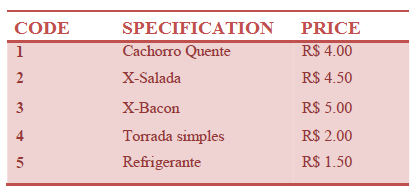
25- Snack :
Using the following table, write a program that reads a code and a amount of an item. After print the value to pay. This is a very simple program with the only intention of practice of selection commands.
Input
The input file contains two integer numbers X and Y. X is the product code and Y is the quantity of this item according to the above table.
Output
The output must be a message "Total: R$ " followed by the total value to be paid, with 2 digits after the decimal point.
Sample Input : Sample Output :
2 3 Total: R$ 13.50
---------------------------------------------------------------------------------------------------------
26- Average 3 :
Read four numbers (N1, N2, N3, N4), which one with 1 digit after the decimal point, corresponding to 4 scores obtained by a student. Calculate the average with weights 2, 3, 4 e 1 respectively, for these 4 scores and print the message "Media: " (Average), followed by the calculated result. If the average was 7.0 or more, print the message "Aluno aprovado." (Approved Student). If the average was less than 5.0, print the message: "Aluno reprovado." (Reproved Student). If the average was between 5.0 and 6.9, including these, the program must print the message "Aluno em exame." (In exam student).
In case of exam, read one more score. Print the message "Nota do exame: " (Exam score) followed by the typed score. Recalculate the average (sum the exam score with the previos calculated average and divide by 2) and print the message “Aluno aprovado.” (Approved student) in case of average 5.0 or more) or"Aluno reprovado." (Reproved student) in case of average 4.9 or less. For both cases (approved or reproved) present the message "Media final: " (Final average) follow by the final average for this student in the last line.
Input
The input contains four floating point numbers that represent the students' grades.
Output
Print all the answers with one digit after the decimal point.
Sample Input : Sample Output :
2.0 4.0 7.5 8.0 Media: 5.4
6.4 Aluno em exame.
Nota do exame: 6.4
Aluno aprovado.
Media final: 5.9
---------------------------------------------------------------------------------------------------------
27- Coordinates of a Point :
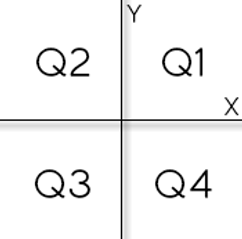
Write an algorithm that reads two floating values (x and y), which should represent the coordinates of a point in a plane. Next, determine which quadrant the point belongs, or if you are over one of the Cartesian axes or the origin (x = y = 0).
If the point is at the origin, write the message "Origem".
If the point is over X axis write "Eixo X", else if the point is over Y axis write "Eixo Y".
Input
The input contains the coordinates of a point.
Output
The output should display the quadrant in which the point is.
Sample Input : Sample Output :
4.5 -22 Q4
---------------------------------------------------------------------------------------------------------
28- Simple Sort :
Read three integers and sort them in ascending order. After, print these values in ascending order, a blank line and then the values in the sequence as they were readed.
Input
The input contains three integer numbers.
Output
Present the output as requested above.
Sample Input : Sample Output :
7 21 -14 -14
7
21
7
21
-14
---------------------------------------------------------------------------------------------------------
29- Triangle :
Read three point floating values (A, B and C) and verify if is possible to make a triangle with them. If it is possible, calculate the perimeter of the triangle and print the message:
Perimetro = XX.X
If it is not possible, calculate the area of the trapezium which basis A and B and C as height, and print the message:
Area = XX.X
Input
The input file has tree floating point numbers.
Output
Print the result with one digit after the decimal point.
Sample Input : Sample Output :
6.0 4.0 2.0 Area = 10.0
---------------------------------------------------------------------------------------------------------
30- Multiples :
Read two values (A and B). After, the program should print the message "Sao Multiplos" (are multiples) or"Nao sao Multiplos" (aren’t multiples), corresponding to the read values.
Input
The input has two integer numbers.
Output
Print the message relative to the input as stated above.
Sample Input : Sample Output :
6 24 Sao Multiplos